Posts

Showing posts with the label Date and Time picker

Disable/Hide Year from DatePickerDialog in android
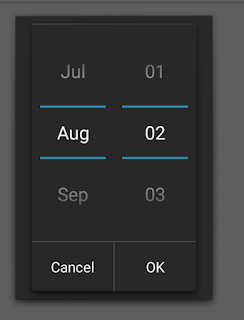
Image
DatePickerDialog in Android is the most essential part . We can easily customize DatePickerDialog in Android . Here is the example to disable/hide Year from DatePickerDialog in Android .   The given bellow code will work from API 5.0+ DatePickerDialog Constructor :  1. Context  : Require Application context  2. new DatePickerDialog.OnDateSetListener(){         onDataSet()  // this method execute when user select date and press ok button           {            a. Year  // selected year            b. Month // selected month , it's return previous month. Suppose you select March then it return 2 insted of 3 .            c. Day  // selected date       }     } ...

Disable/Hide Month from DatePickerDialog in android

Image
DatePickerDialog in Android is the most essential part . We can easily customize DatePickerDialog in Android . Here is the example to disable/hide Month from DatePickerDialog in Android .   The given bellow code will work from API 5.0+ DatePickerDialog Constructor :  1. Context  : Require Application context  2. new DatePickerDialog.OnDateSetListener(){         onDataSet()  // this method execute when user select date and press ok button           {            a. Year  // selected year            b. Month // selected month , it's return previous month. Suppose you select March then it return 2 insted of 3 .            c. Day  // selected date       }     } ...

Date and Time picker dialog in android

Image
Showing DatePickerDialog and TimePickerDialog are the most common feature in android app. DatePickerDialog helps you to pick date and TimePickerDialog helps you to pick time from dialog . TimePickerDialog allows you to pick time either 24 hour or 12 hour mode . These two picker dialog has two different callback methods respectively . DatePickerDialog and TimePickerDialog classes are consists of 5 arguments constructor . DatePickerDialog Constructor :  1. Context  : Require Application context  2. new DatePickerDialog.OnDateSetListener(){         onDataSet()  // this method execute when user select date and press ok button           {            a. Year  // selected year            b. Month // selected month , it's return previous month. Suppose you select Marc...