Posts

Showing posts with the label Java

React Native – Setup

There are a couple of things you need to install to set up the environment for React Native.We will use OSX as our building platform. Install NodeJS and NPM  on UNIX/Linux/Mac OS X, and SunOS : $ cd /tmp $ wget http://nodejs.org/dist/v6.3.1/node-v6.3.1-linux-x64.tar.gz $ tar xvfz node-v6.3.1-linux-x64.tar.gz $ mkdir -p /usr/local/nodejs $ mv node-v6.3.1-linux-x64/* /usr/local/nodejs Add /usr/local/nodejs/bin to the PATH environment variable. Linux : export PATH=$PATH:/usr/local/nodejs/bin Mac   : export PATH=$PATH:/usr/local/nodejs/bin Step 1 – Install Homebrew Open your terminal and run the following code to install Homebrew − /usr/bin/ruby -e "$(curl -fsSL https://raw.githubusercontent.com/Homebrew/install/master/install)" Step 2 – Install Watchman Run the following code to install Watchman. brew install watchman Step 3 – Install React Native Now, run the following code to install React Native. npm install -g react-native-cli Step 4....

Firebase Database Example in Android

Image
What is Firebase :                  The Firebase Realtime Database is a cloud-hosted NoSQL database that lets you store and sync data between your users in realtime.The Firebase Realtime Database is a cloud-hosted database. Data is stored as JSON and synchronized in realtime to every connected client. When you build cross-platform apps with our iOS, Android, and JavaScript SDKs, all of your clients share one Realtime Database instance and automatically receive updates with the newest data. NEW: Cloud Firestore (beta) enables to you store, sync and query app data at global scale. Setup Firebase Realtime Database for Android :  There are two ways you can connect your app to Firebase .     1. Install Firebase SDK     2.Using Firebase Console ,add your app to Firebase .   Install Firebase SDK : If you're using the latest version of Android Studio (vers...

Custom Dialog With Call Back in Android

Image
What is Dialog in Android : A dialog is a small window that prompts the user to make a decision or enter additional information. A dialog does not fill the screen and is normally used for modal events that require users to take an action before they can proceed. Create Custom Layout :   If you want a custom layout in a dialog, create a layout and add it to an AlertDialog by calling setView() on your AlertDialog.Builder object or add it to  Dialod by calling setContentView() on your Dialog object. . Dialog Methods : cancel() : Cancel the dialog. dismiss() : Dismiss the dialog. Removing it from screen . setContentView(int resId) : Set the screen content from layout resource. setCanceledOnTouchOutside(boolean cancel) : Sets whether this dialog is canceled when touched outside the window's bounds.  setCancelable(boolean value) : Sets whether this dialog is cancelable with the BACK key.  requestWindowFeature(int featuredId) : Enable extend...

Disable/Hide Year from DatePickerDialog in android

Image
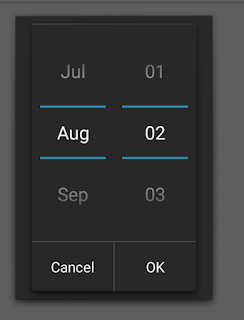
DatePickerDialog in Android is the most essential part . We can easily customize DatePickerDialog in Android . Here is the example to disable/hide Year from DatePickerDialog in Android .   The given bellow code will work from API 5.0+ DatePickerDialog Constructor :  1. Context  : Require Application context  2. new DatePickerDialog.OnDateSetListener(){         onDataSet()  // this method execute when user select date and press ok button           {            a. Year  // selected year            b. Month // selected month , it's return previous month. Suppose you select March then it return 2 insted of 3 .            c. Day  // selected date       }     } ...

Disable/Hide Month from DatePickerDialog in android

Image
DatePickerDialog in Android is the most essential part . We can easily customize DatePickerDialog in Android . Here is the example to disable/hide Month from DatePickerDialog in Android .   The given bellow code will work from API 5.0+ DatePickerDialog Constructor :  1. Context  : Require Application context  2. new DatePickerDialog.OnDateSetListener(){         onDataSet()  // this method execute when user select date and press ok button           {            a. Year  // selected year            b. Month // selected month , it's return previous month. Suppose you select March then it return 2 insted of 3 .            c. Day  // selected date       }     } ...